Planned version 1.3: read-only Migrations Inspector
Version 1.3 build 21, ten refreshed screenshots, and release notes are prepared in App Store Connect. The version remains Prepare for Submission and has not been submitted for review. The current public App Store version is still 1.2. No release date is announced.
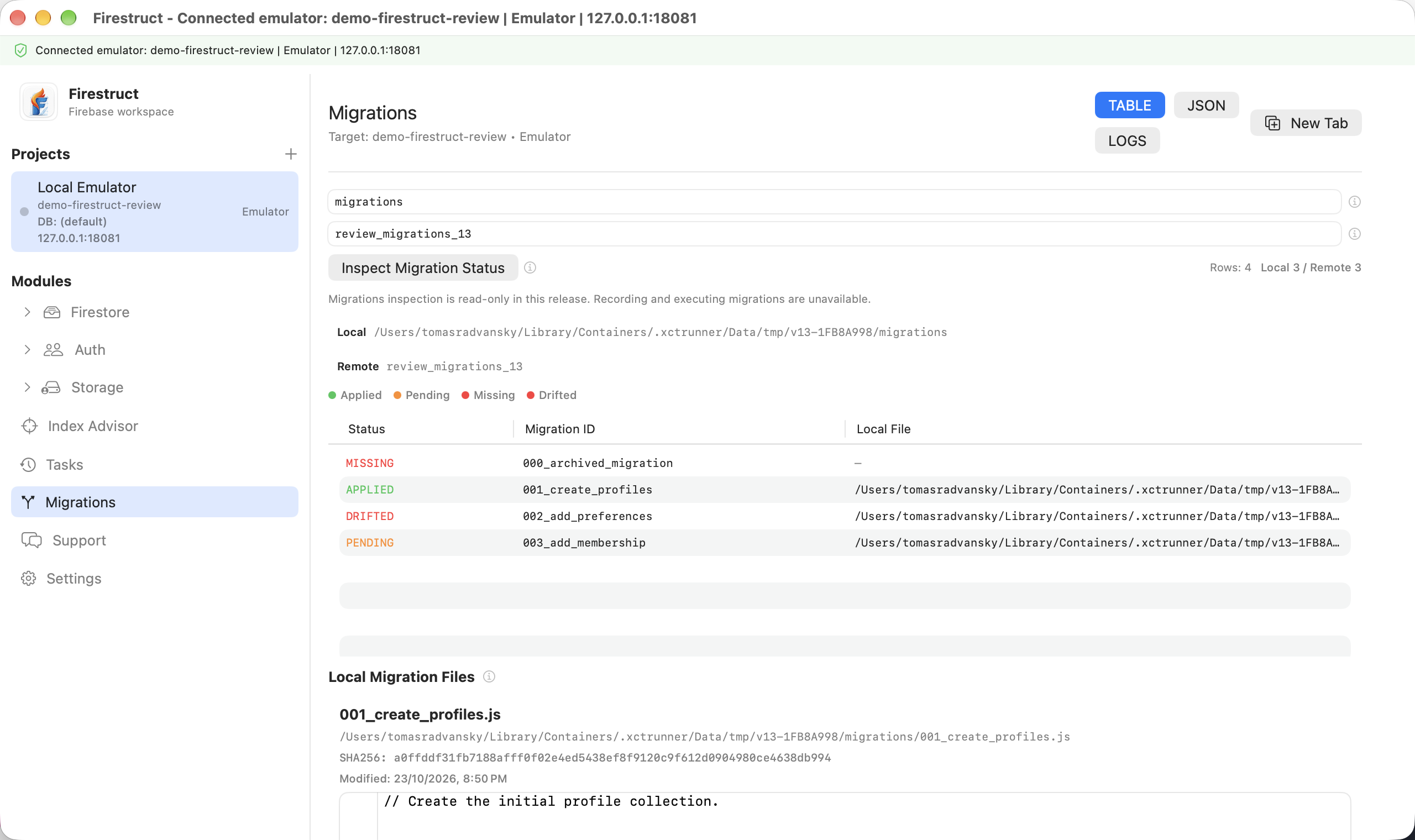
The 1.3 build helps you inspect migration history without running migration source:
- Browse local Fireway files in filename order, with source previews, checksums, and modified dates.
- Load local files and emulator records together through an inspection task, without executing JavaScript.
- Compare files with migration records from the selected Firebase emulator.
- Inspect applied, pending, missing-locally, or changed/drifted status in Table, JSON, and Logs.
- Keep project, database, environment, collection, and task progress visible.
Planned workflow and status meaning
Select a Firebase emulator project. In Settings, save its local workspace folder, then open Migrations. Choose the local migrations folder and the emulator record collection (for example, fireway), check the selected project/database/environment, and choose Inspect Migration Status. Review the task result in Table, JSON, and Logs.
Standalone local-only inspection remains planned. The current build loads files and emulator records together; a failed record comparison does not provide a local-only snapshot. Source previews are capped at 1,200 characters and should not be treated as complete source files. Inspect the original file in your workspace when you need the full source.
For a comparison, select an emulator project and migration-record collection (for example, fireway). Pending means no matching record was found in that loaded comparison; missing locally means a record has no corresponding file. Drifted means a stored checksum differs from the current source. Applied describes a matching record without a known mismatch; it is not proof that the script succeeded, and records without checksums cannot establish source integrity.
The 1.3 configuration is read-only, including Free inspection and project read-only mode once a workspace is configured. Saving the workspace link is a separate Pro-gated action. The inspector does not execute scripts, write records, mark migrations as applied, restore data, or deploy anything. Production record browsing is deferred until its authentication flow is verified.
The development workflows below describe existing internal and CLI evidence. They are separate from the read-only 1.3 app configuration and are not features of the current public App Store release.
Public references: Roadmap and Migrations guide.
Current 1.3 development configuration
Xcode uses marketing version 1.3 and enables the Migrations module. With the checked-in configuration, Free users can inspect linked local files while comparing against an emulator, including read-only projects. Standalone local-file loading remains planned.
FIRESTRUCT_FEATURE_MIGRATION_WRITES = NO hides the record and execution controls and rejects their actions before a task is queued. Release builds compile those capabilities out even if a runtime flag is changed. Production and other non-emulator record comparison is unavailable in this configuration. Debug-only mutation tests use an explicit capability override; purchases do not enable it.
Existing development implementation
The Migrations module integrates local Fireway migration files with Firestore migration records. It helps users inspect migration status, source contents, record pending migrations as applied when an external migration runner has already executed them, execute pending migration source against Firebase emulators, and verify environment alignment before any execution workflow is used.
Inputs
- linked local workspace path
- Fireway migration files
- configured migration collection
- selected project/database
- Firestore migration records
Outputs
TABLE: migration status rowsJSON: raw migration records and file metadataLOGS: local file, Firestore, parse, and comparison logs
Actions
Development-only GUI coverage includes listing status, source file content, a record-only "Record Pending As Applied" workflow, and an emulator-only "Execute Pending (Emulator)" workflow. The two mutation actions are disabled in the 1.3 release configuration. The record-only action writes migration records for pending local files through the task queue; it does not execute Fireway source code.
GUI source execution is emulator-only in explicitly enabled development builds. It runs pending Fireway-compatible JavaScript through the task queue, applies emitted Firestore mutations to the selected Firestore emulator, records migration state, refreshes status rows, and keeps rollback notes/logs visible. Production/live execution must not be claimed until approved live verification proves the workflow and guardrails.
Use this module when a release or support session needs to answer four questions before running any migration tooling: which local files exist, which Firestore migration records exist, which files appear unapplied, and which project/database is being inspected. Keeping those details in one view reduces the risk of comparing local development files against the wrong Firebase environment.
The source preview is intentionally part of the workflow. Review the migration body, file name, identifier, and remote record together before recording a pending file as applied or using the emulator execution path. If a record is missing or mismatched, use the logs output to determine whether the issue came from local file discovery, workspace-link configuration, Firestore access, or migration collection setup.
Safety
The following mutation rules describe development tools. The 1.3 release configuration hides and rejects both record-applied and source execution, including for Pro users.
- Recording migrations as applied is Pro-gated.
- Read-only projects reject record-applied state writes before any task is queued.
- Production record-applied state writes require explicit confirmation.
- Record-applied state writes run through Tasks and surface task logs/progress.
- Migration source execution is GUI-available for emulator projects only.
- Non-emulator source execution rejects before task enqueue.
- Source file content and remote records should be visible before recording state or using the emulator execution path.
Current Verification
MigrationWorkflowCopyTests/testMigrationWorkflowCopyDistinguishesInspectRecordAndExecuteproves the GUI-facing labels distinguish status inspection, record-only state writes, emulator-only source execution, and live execution boundaries.MigrationWorkflowCopyTests/testProductionRecordAppliedGuardUsesRecordOnlyWordingproves production confirmation rejection uses record-applied state-write wording and does not queue logs before confirmation.MigrationWorkflowCopyTests/testProductionRecordAppliedPromptNamesStateWriteNotExecutionproves the production prompt says the action does not execute migration source.MigrationWorkflowCopyTests/testReadOnlyRecordAppliedRejectsBeforeQueueingTaskproves read-only GUI record-applied requests stop before task enqueue.MigrationWorkflowCopyTests/testGUIRecordAppliedWritesPendingMigrationRecordThroughTaskQueueAgainstEmulatorproves the GUI/AppModel record-applied action queues a task against real Firebase emulators, writes the migration record, refreshes applied status, records rollback notes/logs, and reads back the emulator document.MigrationWorkflowCopyTests/testGUIExecutePendingMigrationSourceWritesEmulatorMutationAndRecordproves the GUI/AppModel source-execution action queues a task against real Firebase emulators, runs Fireway-compatible JavaScript, applies the emitted Firestore mutation, records migration state, refreshes applied status, and reads back both the script-written emulator document and migration record.MigrationWorkflowCopyTests/testNonEmulatorMigrationExecuteRejectsBeforeQueueingTaskproves GUI source execution rejects non-emulator projects before task enqueue.FirestructCLIIntegrationTests/testCLICommandsRoundTripAgainstFirebaseEmulatorsproves emulator-backed migration status,record-appliedrecord-only writes, and emulator-only JSapplyexecution with Firestore mutation and migration-record read-back evidence.
Source Anchors
Sources/FirestructApp/Features/Migrations/UI/MigrationExplorerView.swiftSources/FirestructApp/Features/Migrations/Services/AppModel+MigrationActions.swiftSources/FirestructApp/Features/Migrations/Model/MigrationStore.swiftSources/FirestructApp/Features/Migrations/Model/MigrationWorkflowCopy.swiftSources/FirestructCore/FirewayIntegrationService.swiftSources/FirestructCore/ProjectRegistry+Migrations.swift